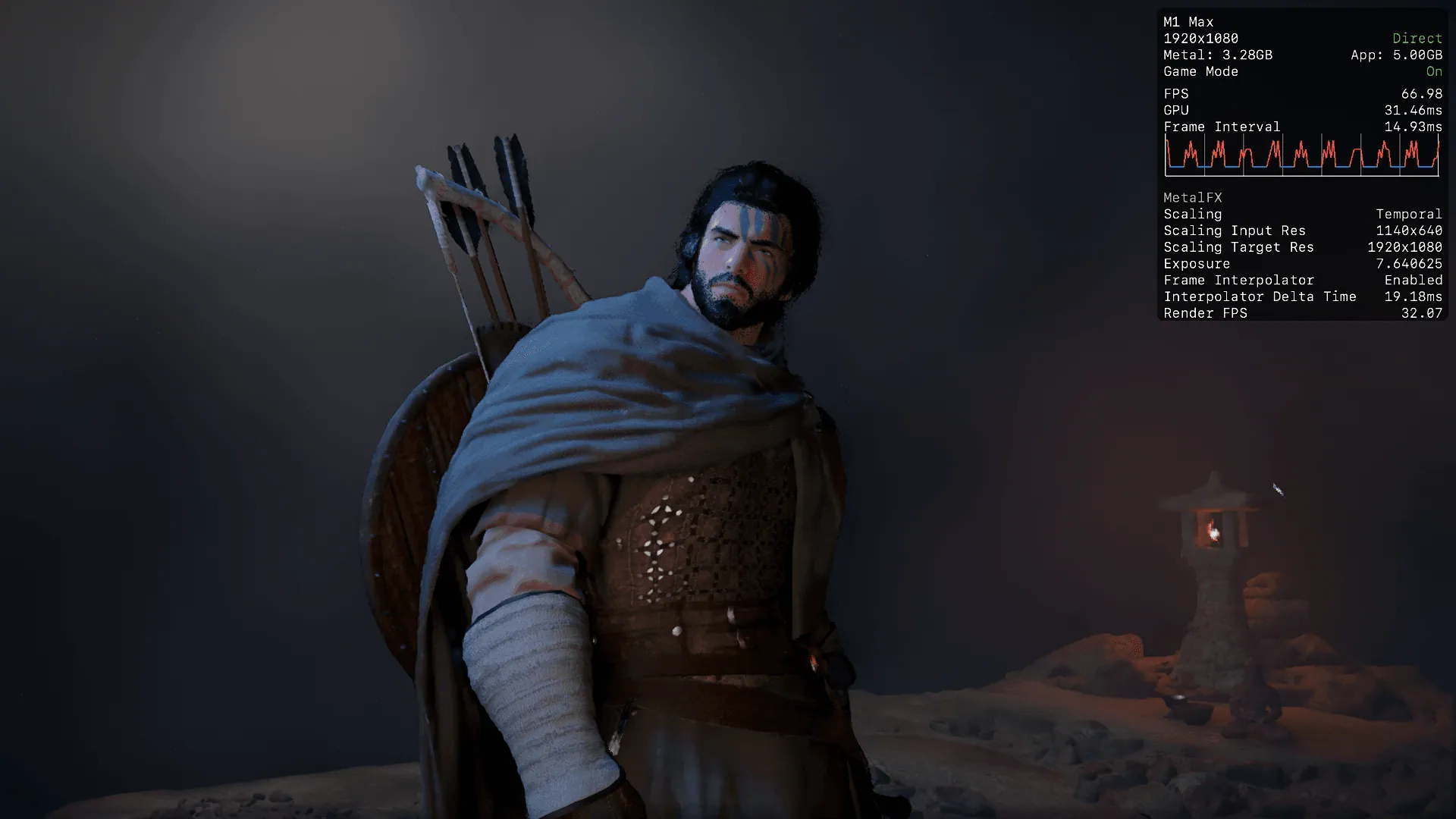
Crimson Desert crawls on the M1 Max
Pearl Abyss's Crimson Desert launched yesterday with Mac support, but the M1 Max isn't on the spec sheet, and for good reason.
Crimson Desert dropped yesterday. Pearl Abyss's action-adventure title launched on macOS, PlayStation 5, Windows, and Xbox Series X/S on March 19, 2026. The reception has been mixed, some users reporting that Intel GPU owners are unable to play the game at all and frequent stutters on the PC version reported even with high end rigs.
The Mac spec sheet is interesting. Take a look:
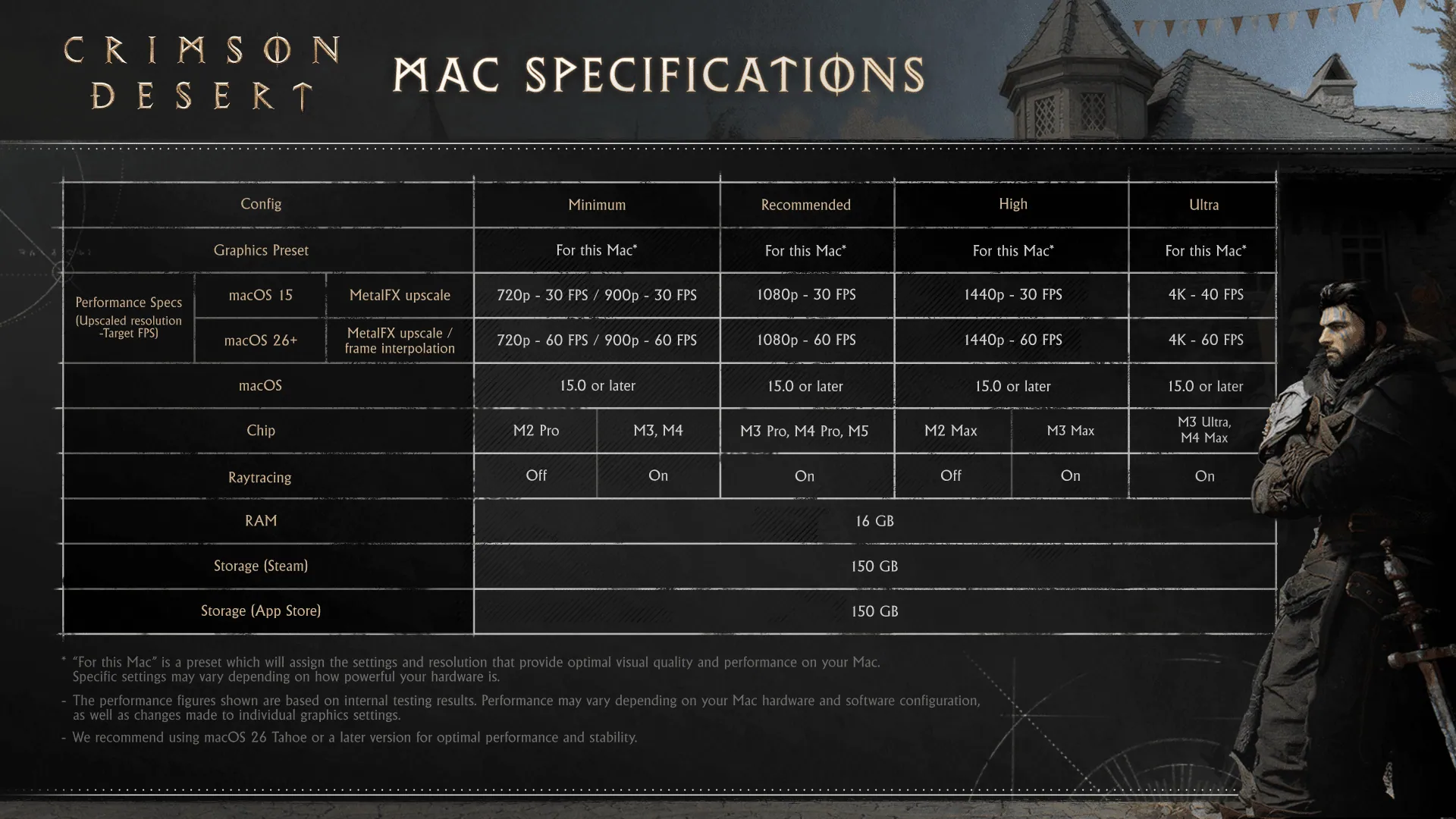
The M1 generation is nowhere to be found. The minimum listed chip is the M2 Pro for 720p/30fps, scaling up to M3 Ultra and M4 Max for 4K/60fps. Yet the apple app store lists M1 or newer as the requirements to run.
Ray tracing support starts at M3 and the game requires 16GB of RAM and 150GB of storage.
I have a 14" MacBook Pro (late 2021) with the full 32-core M1 Max and 64GB of unified memory. In raw Metal compute, the M1 Max scores 111,641 versus the M4 Pro's 110,229. The compute is there, but Apple added hardware ray tracing and mesh shading in the M3 generation, so the M1 Max is missing architectural features that newer chips have.
The question is simple: does Crimson Desert run on the M1 Max, and if so, how well?
Short Answer
Yes, it runs, but barely.
I encountered one crash during testing, and a small graphical glitch that rendered terrain black for a brief moment as the character during the intro scene walked through a portal into the forest area. I was unable to achieve a compelling experience regardless of settings. Frame pacing is inconsistent, input latency is severe with framegen, and the motion feels off even when the framerate counter looks reasonable.
I wouldn't recommend the M1 Max for playing Crimson Desert in it's current state at all.
"For This Mac" Settings
The game's auto-detect for the M1 Max landed on the Minimum quality preset and, interestingly, switched the resolution to 900p rather than native or 1080p. With MetalFX and frame generation enabled at these settings, the game couldn't hold 60fps during the intro sequence, dipping to as low as 45fps in places. Input latency was severe enough that simply walking around felt like remotely controlling a character from another continent.
The Real Problem
Even at higher frame rates, the experience doesn't improve meaningfully. Camera rotation and character movement have inconsistent motion pacing that makes the game feel janky regardless of what the FPS counter reads. Combined with the input latency, the result is something that technically runs but doesn't feel good to play.
The A18 Pro is Smoother
Here's the surprising part. I tested Crimson Desert on the MacBook Neo with the A18 Pro, a chip with far less GPU compute than the M1 Max. At 1080p Minimum with no upscaling, the A18 Pro managed just 9fps. Even with MetalFX Ultra Performance and frame generation, it doesn't break 30fps unless the resolution is dropped to 720p.
And yet, the experience is noticeably smoother. The frame pacing issues that plague the M1 Max simply aren't present on the A18 Pro. Despite achieving much lower framerates, the motion is more consistent and less jarring to play.
This points to something architectural rather than raw performance. The A18 Pro is built on a newer process with hardware features the M1 Max lacks, including accelerated mesh shading and hardware ray tracing support. My hypothesis is that the M1 Max's older architecture and limited per-core performance are creating a bottleneck that prevents the game from pacing frames correctly. The GPU has enough aggregate compute to push pixels, but the pipeline can't deliver them smoothly.
It's a reminder that raw TFLOPS don't tell the whole story. The M1 Max might match or exceed the M4 Pro in synthetic compute benchmarks, but modern game engines increasingly depend on architectural features that simply don't exist on the M1 generation.
Although I captured telemetry via powermetrics in macOS, I don't trust the numbers as combined system power reported 20 watts during the testing but power from the wall was ~80w using an official Apple 140W USB-C charger and magsafe connection.