MacBook Neo: Thermal Pad Mod
A 1mm thermal pad over the MacBook Neo's graphite sticker makes Crimson Desert surprisingly playable, with mixed gains elsewhere.
The Mod
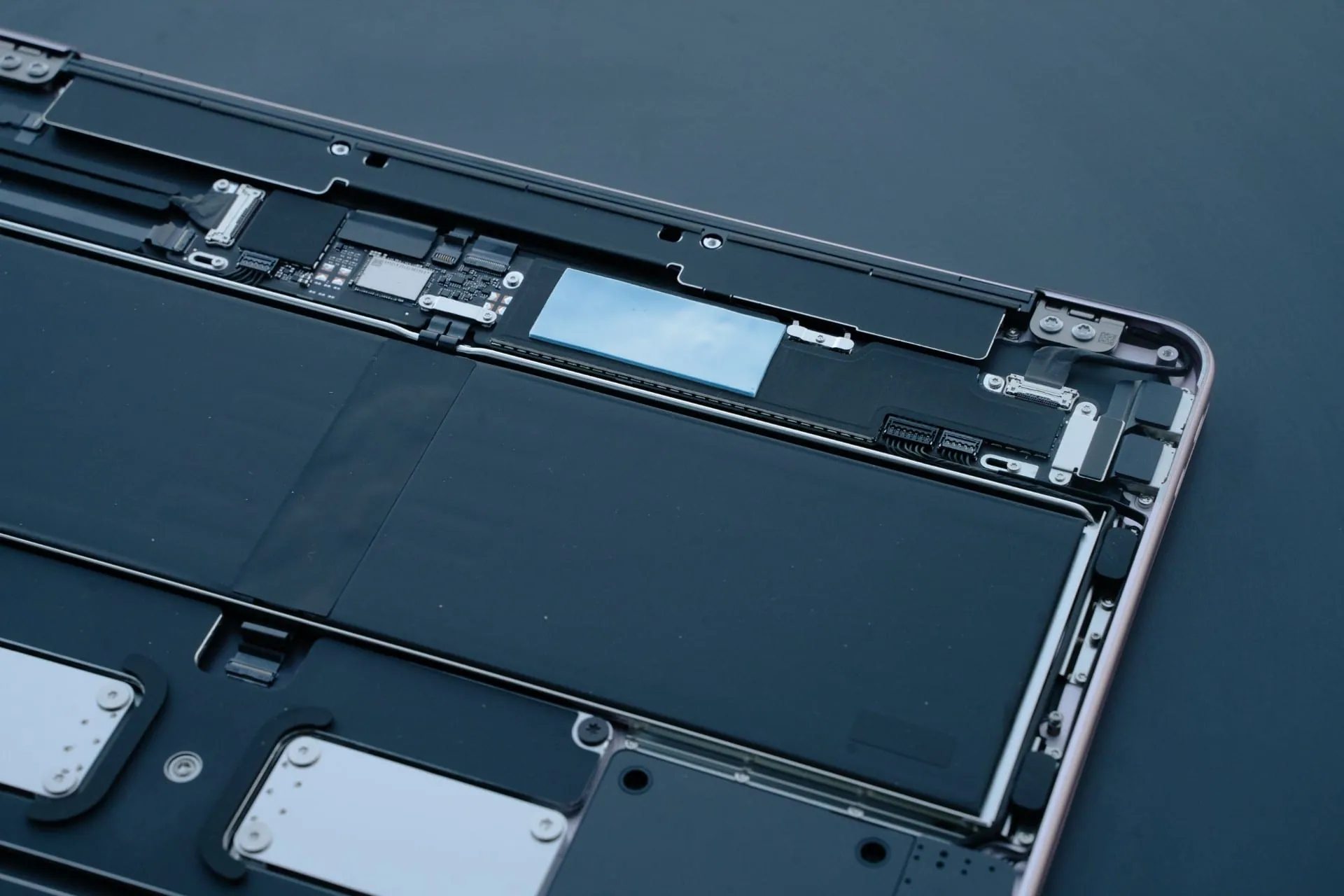
The MacBook Neo's logic board is covered by a graphite thermal sticker beneath the aluminium bottom tray. Placing a 1mm thermal pad over this sticker lets the chassis conduct more heat away from the SoC, at the cost of a noticeably warmer underside.
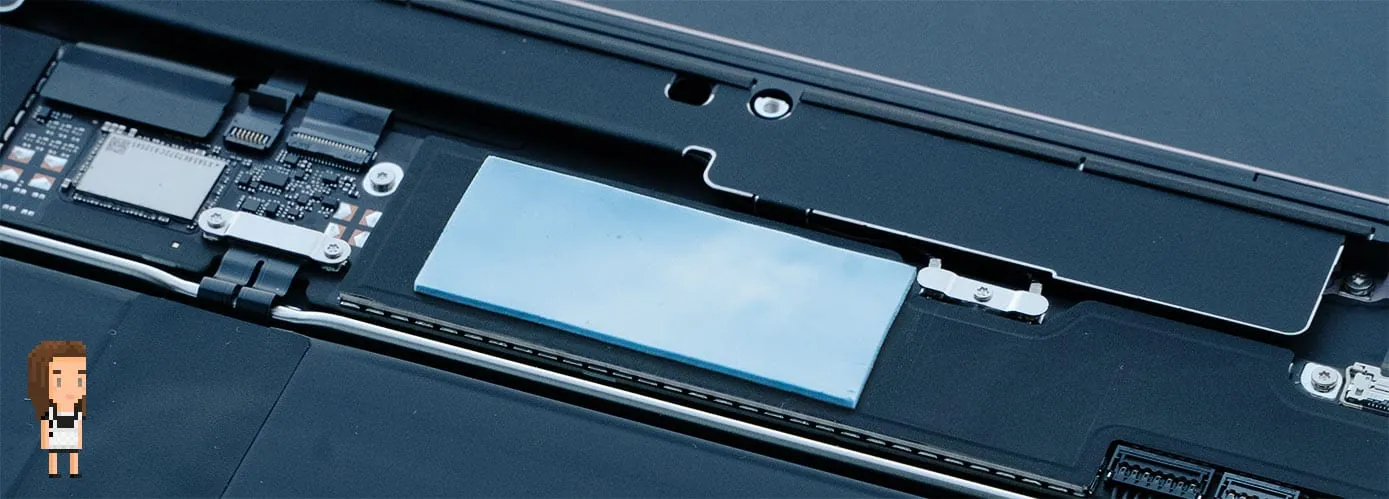
The A18 Pro uses TSMC's InFO-PoP (Integrated Fan-Out Package on Package) design, where the LPDDR5X memory sits directly on top of the processor die. Heat has to transfer through the DRAM before reaching the graphite layer and chassis, so external thermal padding can only do so much. The chip is power-limited rather than thermally throttled in the traditional sense. With the mod, the SoC sustains roughly 2W more than stock, but that extra headroom doesn't always translate to better performance.
Crimson Desert: Surprisingly Playable
Crimson Desert is where the thermal mod makes a tangible difference.
In my look into Crimson Desert on the M1 Max I briefly tested a static scene on the A18 Pro at 1080p with MFX Ultra Performance and frame generation turned on. Prior to the mod that scene delivered 26fps, yet after it achieved 34fps... a 30% uplift.
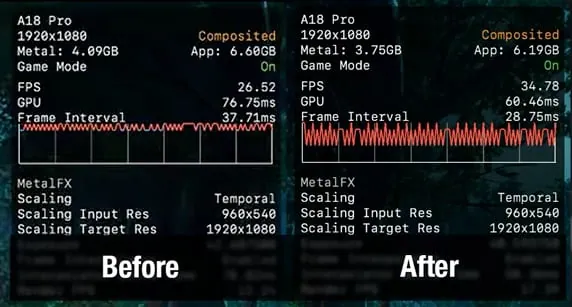
Using this performance uplift, I decided to try and dial in settings where the game was somewhat playable, and settled on 1280x720 with MetalFX Quality and Frame Generation enabled.
These settings upscale from 856x480 to 1280x720, and you can push closer to 55-60fps with MetalFX Ultra Performance, but that renders at 428x240 and the game becomes a pixelated, unintelligible mess. Quality is the sweet spot.
This MacBook Neo is well below Pearl Abyss's recommended specifications, but the experience is surprisingly playable. The video compression struggles with the noise in the footage so it looks a little worse here than it does locally, but it's a smooth albeit not high fidelity experience.
Crimson Desert 720p Min + MFX Quality + FG - Thermal Pad Mod
The GPU is also able to sustain its peak clocks more consistently with the mod, rarely dipping below 1.4GHz.
Cyberpunk 2077
Gains in Cyberpunk 2077 are modest but consistent across four configurations, ranging from 4-8%.
Cyberpunk 2077 - Avg FPS Before & After Thermal Pad
| Configuration | Before (FPS) | After (FPS) | Gain |
|---|---|---|---|
| 1080p Low | 16.17 | 16.93 | +4.7% |
| 1080p Medium | 12.41 | 12.94 | +4.3% |
| 1080p Low + MFX Perf + FG | 46.05 | 47.87 | +3.9% |
| 720p Low + MFX Perf + FG | 70.41 | 76.38 | +8.5% |
All tests at 1080p 120Hz external monitor, VSync off. MFX = MetalFX, FG = FSR 3.1 frame generation. 'Before' values from the original MacBook Neo review.
Cinebench 2024: A Surprising Result
With more thermal headroom, you'd expect a small bump in sustained CPU performance too. I ran Cinebench 2024 multi-core for 10 minutes with the thermal pad installed. The result: 398 points, slightly lower than the 426 I scored without the mod.
The thermal pad clearly lets the chip sustain a higher power budget. It peaks at around 8W before settling to roughly 6.5W for seven minutes, then slowly tapering to about 5.8W for the remainder. Even with this extra power, the P-cores only manage about 2.8GHz, dropping towards 2.6-2.7GHz as power decreases. In both tests, the P-cores start at roughly 3.0GHz before quickly reducing clocks.
Compare this to the stock run, where the P-cores hover just above 2.3GHz and the E-cores more frequently dip below their 2.42GHz clock. My hypothesis is that the extra thermal headroom changes how the chip schedules work across core types, favouring the P-cores at the expense of E-core utilisation, but I haven't confirmed this definitively.
I haven't looked at chip temperatures as my logging tool doesn't capture that data, but the A18 Pro is almost certainly above 100C throughout both tests. Either way, the chip sustains an additional 2W with the mod, yet this doesn't translate to meaningful gains in either games or benchmarks.
Cinebench 2024 MC - Thermal Pad Mod vs Stock
Worth It?
For gaming, the thermal pad makes Crimson Desert genuinely more playable and adds a few frames in Cyberpunk 2077. Hopefully that's not what you're buying a Neo for, and for sustained CPU workloads, more cooling appears to shift the chip's behaviour in ways that seem to hurt performance. The real ceiling is the chip's power budget and InFO-PoP packaging, not the cooling solution.
I wouldn't recommend doing this to your Neo, as it's unclear what the long term effects will be. I don't have the tools to measure surface temperatures, but I can't imagine it'd be pleasant to touch the underside of the Neo after an hour of gaming.