MacBook Neo: Power & Connectivity
Battery life, charging, port limitations, and wireless connectivity on the MacBook Neo.
Battery
The MacBook Neo ships with a 36.5Wh battery, smaller than the Air's 52.6Wh cell. Apple includes a 20W USB-C power adapter in the US. In Europe, no charger is included. My Dublin-purchased unit came without one.
The charging port appears to accept more than 20W, so a higher-wattage USB-C charger should speed things up.
I'll leave the standard battery life tests (web browsing, video playback) to other reviewers who have more structured testing rigs for that kind of thing. What I'm more interested in is the Low Power Mode that macOS exposes on the Neo, and how it affects real-world power consumption under sustained load.
Low Power Mode & Sustained Load
macOS lets you toggle Low Power Mode in System Settings. On the Neo, I expected it to meaningfully throttle the chip's power budget, but the results tell a different story. I ran Cinebench 2024 multi-core in Low Power Mode, capturing telemetry via powermetrics throughout, and combined power remained just above 4.5W for most of the run. That's essentially the same power envelope as the normal mode run, which settled to roughly the same figure after its initial peak.
The Low Power Mode run scored 394 pts, compared to 426 pts in normal mode. The slightly lower score suggests some minor throttling, but the takeaway is clear: Low Power Mode doesn't appear to meaningfully constrain the A18 Pro's power consumption on this machine. The chip is already running at such low power levels that there isn't much for Low Power Mode to cut.
This reinforces the idea that the A18 Pro in this chassis is already operating near its floor. There's simply not much headroom for macOS to pull back.
Charging Speed
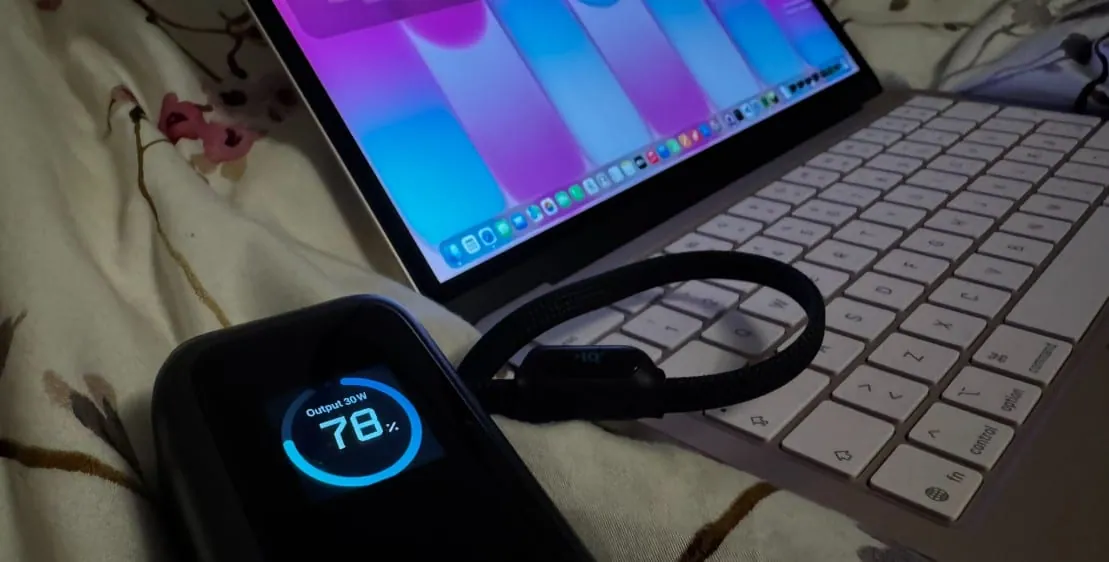
I won't be running structured charge-time tests for this review, but I did notice an interesting behaviour with the power bank. The 30W draw from the Anker power bank only appeared to kick in when the laptop was below roughly 50% battery. Above that threshold, the draw dropped noticeably. This suggests the Neo uses a more aggressive charging curve at lower charge levels and tapers off as it fills up, which is common behaviour for lithium-ion cells but worth noting if you're planning to top up quickly.
External Power Draw
I tested the Neo with an Anker power bank that displays output wattage. The power bank had no issue delivering 96W to my MacBook Pro 14", but with the Neo it showed a consistent 30W output when the battery was low, even under full load during a Cinebench multicore test. The laptop appears to cap external power draw regardless of the power source's capacity.
Battery Life: Cyberpunk 2077 Stress Test
To get a real-world worst-case figure, I ran Cyberpunk 2077 on the internal display at 1408x881, Low settings with MetalFX Performance enabled and no frame generation. Speakers were on at a low volume, display brightness set to roughly halfway on the slider. This felt like the most realistic performance profile for casual gaming, a balance between visual quality and speed that I'd actually use with a controller.
The Neo lasted 3 hours and 48 minutes before powering down. I captured the entire run via powermetrics at 1-second intervals. Power consumption sat near the ceiling for the entire duration, making this a genuine worst-case scenario. Notably, there was no apparent throttling during the session. The chip maintained its power budget from start to finish, suggesting that while the chassis got warm, the passive cooling was sufficient to sustain the load without pulling back.
For context, 3h48m of continuous gaming on a 36.5Wh battery is a reasonable result. Lighter workloads like web browsing, writing, or media consumption should comfortably last a full working day.
Ports
The Neo has two USB-C ports and a 3.5mm headphone combo jack, all on the left side.
Here's the catch: only the USB-C port closest to the display operates at USB 3 speeds. The second port is USB 2.0 only. Both can charge the laptop, but if you need to connect an external drive or display, you're limited to a single port.
External display support maxes out at one display at 4K 60Hz, connected through the USB 3 port.
This is the Neo's most frustrating limitation. With only one high-speed port, connecting an external display means you lose your only fast data port. A hub or dock helps, but adds cost and desk clutter to what's supposed to be a budget machine.
I tested a USB-C adapter with DisplayPort alt-mode on the USB 3 port, hoping to maintain external drive speeds through the adapter. On my MacBook Pro 14" with the same adapter, external storage hits expected USB 3 speeds. On the Neo, file transfers crawled at USB 2.0 rates. Whether this is a bus sharing limitation or a bandwidth constraint when running alt-mode is unclear, but the practical result is the same: your external storage slows down with a display connected. Most buyers in this segment will never notice, and those that do will have to live with it.
Wireless
- WiFi 6E (802.11ax) with support for 2.4GHz, 5GHz, and 6GHz bands
- Bluetooth 6
WiFi 6E is a welcome inclusion at this price point. Most laptops in this range still ship with WiFi 6.