MacBook Neo: Gaming with just 5 watts
My tests show system package power is limited by a 5 watt ceiling. Let's look at powermetrics running Cyberpunk 2077, WoW and Minecraft on the MacBook Neo's A18 Pro GPU.
Can You Game on a $599 Mac?
The A18 Pro has 5 GPU cores and 8GB of shared memory. That's not a gaming spec sheet, but the Apple GPU architecture is efficient and macOS game support has improved significantly. Let's see what this thing can actually do.
GPU Compute
This is an educated guess rather than an official figure, and TFLOPS on its own isn't a particularly useful metric for predicting real-world gaming performance. That said, it's interesting to deduce, and I'd be curious if others arrive at a different number.
The A18 Pro's full die has 6 GPU cores with 128 FP32 ALUs each, giving it 768 FP32 ALUs total. The MacBook Neo's binned 5-core variant, with a maximum clock speed of 1490MHz, delivers approximately 1.9 FP32 TFLOPS peak theoretical (5 cores × 128 ALUs × 2 ops × 1490MHz). Real-world sustained performance will be lower given thermals and workload, but the unified memory architecture and 60 GB/s of bandwidth give it more headroom than raw TFLOPS alone would suggest.
Unless otherwise noted, all gaming tests were run at 1080p on an external monitor at 120Hz for consistent and comparable results. VSync was disabled for all runs. Not every game gets the full benchmark treatment, some are just quick impressions with rough performance figures.
Cyberpunk 2077
CD Projekt Red lists 16GB of RAM as a Mac system requirement for Cyberpunk 2077, so I'm already pushing my luck. I tested four configurations to see how far I could get.
Cyberpunk 2077 - MacBook Neo Frame Rates
| Configuration | Min FPS | Avg FPS | Max FPS |
|---|---|---|---|
| 1080p Low | 12.66 | 16.17 | 20.63 |
| 1080p Medium | 9.56 | 12.41 | 18.39 |
| 1080p Low + MFX Perf + FSR 3.1 | 37.63 | 46.05 | 55.86 |
| 720p Low + MFX Perf + FSR 3.1 | 51.57 | 70.41 | 97.96 |
All tests at 120Hz to external monitor, VSync off. MFX = MetalFX Performance preset, FSR = AMD FSR 3.1 frame generation.
Without MetalFX or FSR, the game is a slideshow. 1080p Low averages just 16 fps, and bumping to Medium makes it worse at 12 fps. Enabling MetalFX Performance and FSR 3.1 frame generation at 1080p Low brings the average up to 46 fps, which sounds playable on paper but came with noticeable stutters and poor frame pacing.
Dropping to 720p with the same upscaling stack pushed past 60 fps average, peaking at nearly 98 fps. But this came at the cost of image clarity, and the stutters persisted. The experience felt very similar to running the game on an M1 MacBook Air, which I sadly no longer own for a direct comparison.
I didn't observe any meaningful difference in gaming performance without an external display attached, so the numbers above should be representative regardless of your setup.
System Telemetry
Explore the raw powermetrics data from each test run below. The data shows CPU/GPU power draw, clock speeds, and utilisation over the course of each session.
Cyberpunk 2077 - System Telemetry
The Verdict on Cyberpunk
I wouldn't recommend playing Cyberpunk 2077 on the MacBook Neo. While MetalFX and FSR can push frame rates into nominally playable territory, the stutters, lack of clarity, and memory pressure make it a poor experience. The game consistently pushed memory usage close to 6GB, leaving very little headroom for macOS.
That said, it's encouraging that the game runs at all. An A19 Pro-based Neo with an extra 4GB of memory and a slight GPU bump could make this a genuinely playable experience in the future.
World of Warcraft: TBC Anniversary
WoW is an old game with old assets, albeit running on a newer engine with fancy shadows and water effects. I tested at 1080p on the external monitor using the highest graphical preset (setting 10 on all sliders) with 2xMSAA and no resolution scaling.
In Honor Hold I maintained a stable 58 fps, often climbing into the low 60s, with drops to the upper 30s in the open world. Stormwind's Trade District, packed with what felt like at least 100 players, sat around 43 fps at max settings. Disabling 2xMSAA and bringing the settings slider down to 3 (from the maximum 10) jumped to a healthy ~96 fps, a dramatic improvement for relatively little visual sacrifice.
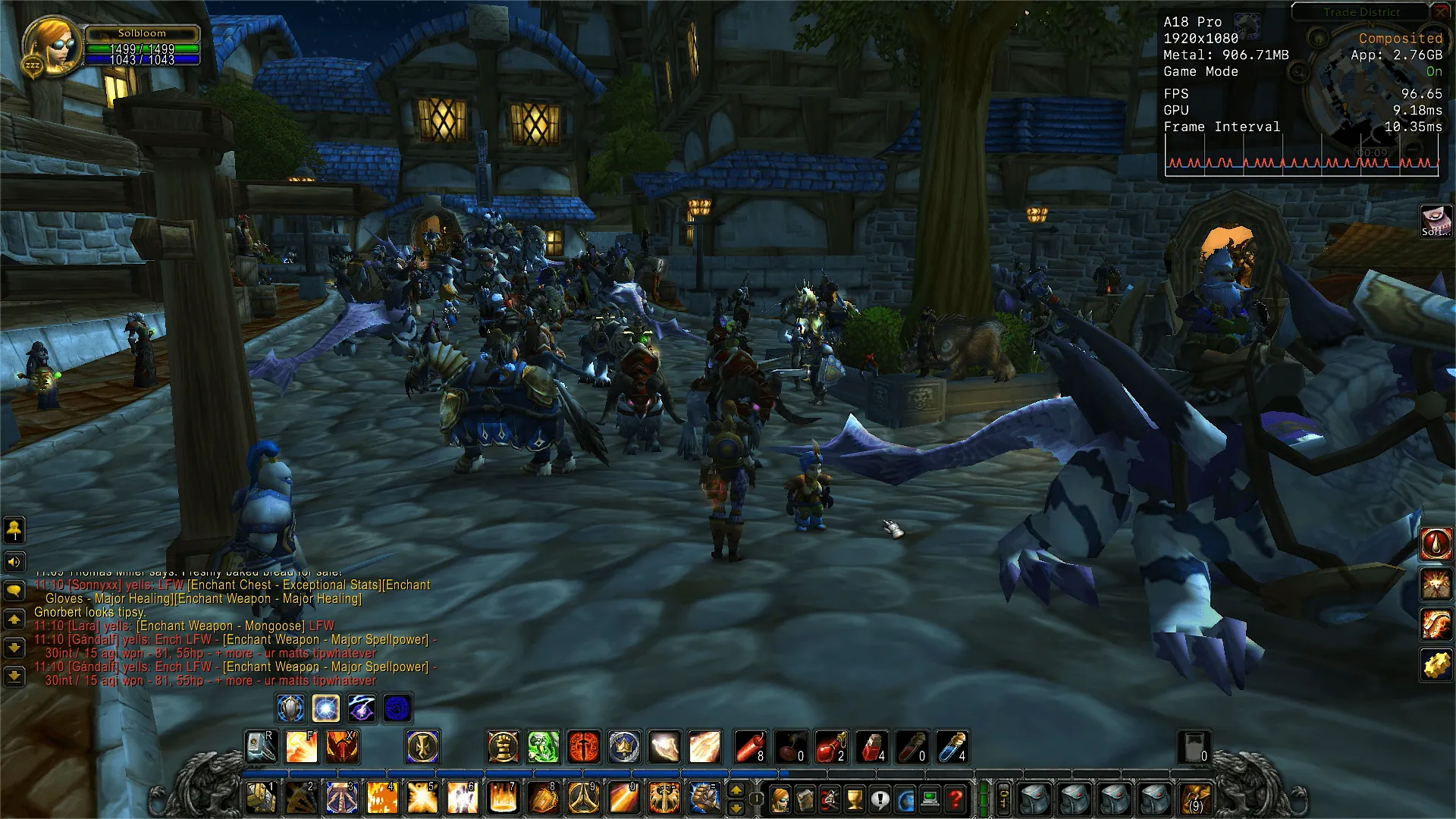
It's fair to say you can quite comfortably play WoW on a high refresh rate monitor with slightly reduced settings. Unplugging the external display and running natively at the laptop's internal resolution of 2408x1506 on setting 3 with no MSAA, the framerate sat at 69 fps and pretty consistently stayed above 60 even walking around the Trade District. Certainly playable.
Minecraft (Java Edition)
Minecraft Java 1.21.11, vanilla client, no mods, no shaders. Tested at 1080p on an external monitor at 120Hz with VSync enabled.
On the Fancy preset, the game runs beautifully. Even in a worst-case scenario, a dense forest with as many trees crammed into view as possible, the framerate held at 62 fps with no modifications.
Flying around in creative mode at full speed saw chunks load in faster than I could reach them, with few stutters and a framerate that comfortably sat between 80 to 100 fps for most of the time.
Switching to Fabulous graphics, which sets a 32-chunk render distance, dropped the framerate to around 41 fps, occasionally dipping to 30 fps while moving. Running natively on the internal panel at 2408x1506, that dropped further to 26 fps. Switching back to Fancy at native resolution brought us comfortably above 60 fps again.
It's fair to say that vanilla Minecraft runs perfectly fine on the MacBook Neo.
System Telemetry (Non-Cyberpunk)
Explore the raw powermetrics data from games other than Cyberpunk below. Cyberpunk has its own telemetry section above due to the number of configurations tested.
Gaming - System Telemetry
The 8GB Problem
8GB of shared memory means the GPU has less VRAM to work with than dedicated gaming hardware. CD Projekt Red specifies 16GB of RAM for Mac as a system requirement, so it's unsurprising Cyberpunk isn't practically playable. Some titles will refuse to load high-resolution textures, and others may not launch at all if they require more than what's available after macOS takes its share.