MacBook Neo: Display & Webcam
A closer look at the Neo's 1080p webcam and 13-inch 60Hz panel, colour accuracy, and brightness.
Panel Specs
The MacBook Neo features a 13-inch IPS display at a resolution of 2408 x 1506 (219 PPI). It's a 60Hz, 10-bit panel rated for 500 nits of peak brightness.
At this resolution and screen size, text rendering is sharp and the pixel density is comfortable for extended reading and development work, first impressions are good.
Colour & Brightness
The panel supposedly covers the full sRGB gamut but lacks P3 wide colour certification. In practice, colours look accurate and consistent with what I'd expect from Apple. Photographs and UI elements render naturally, though anyone doing colour-critical work in photography or video will want a P3 display.
I don't have calibration hardware to verify the 500-nit claim, but subjectively the display is bright enough for indoor use and holds up in well-lit rooms. It's cloudy here in Dublin, but the display is still usable on the balcony.
60Hz
This is a 60Hz panel. There's no ProMotion, no adaptive refresh. If you're coming from a 120Hz MacBook Pro or a high-refresh-rate external monitor, you will notice the difference in scrolling smoothness and cursor movement. If the Neo is your first Mac or you're coming from another 60Hz laptop, it won't bother you.
For the target audience of this machine, 60Hz is a reasonable trade-off at $599.
Compared To
Display Comparison
| Model | Size | Resolution | PPI | Refresh Rate | Peak SDR Brightness | Colour Space |
|---|---|---|---|---|---|---|
| MacBook Neo | 13" | 2408×1506 | 224 | 60Hz | 500 | sRGB |
| MacBook Air 13" (M4) | 13.6" | 2560×1664 | 224 | 60Hz | 500 | P3 |
| MacBook Pro 14" (M4) | 14.2" | 3024×1964 | 254 | 120Hz | 1000 | P3 |
Brightness values are manufacturer-rated peak SDR nits.
External Display
Apple rates the MacBook Neo for a single external display at 4K60 over its USB-C port closest to the hinge. That's the official spec, but it doesn't tell the whole story.
I connected a 1080p MSI G255PF E2 monitor and was able to run it at 120Hz without any issues. macOS detected the panel correctly and offered 120, 90, 82, and 60 Hertz refresh rate options. Scrolling and cursor movement felt noticeably smoother than the built-in 60Hz panel.
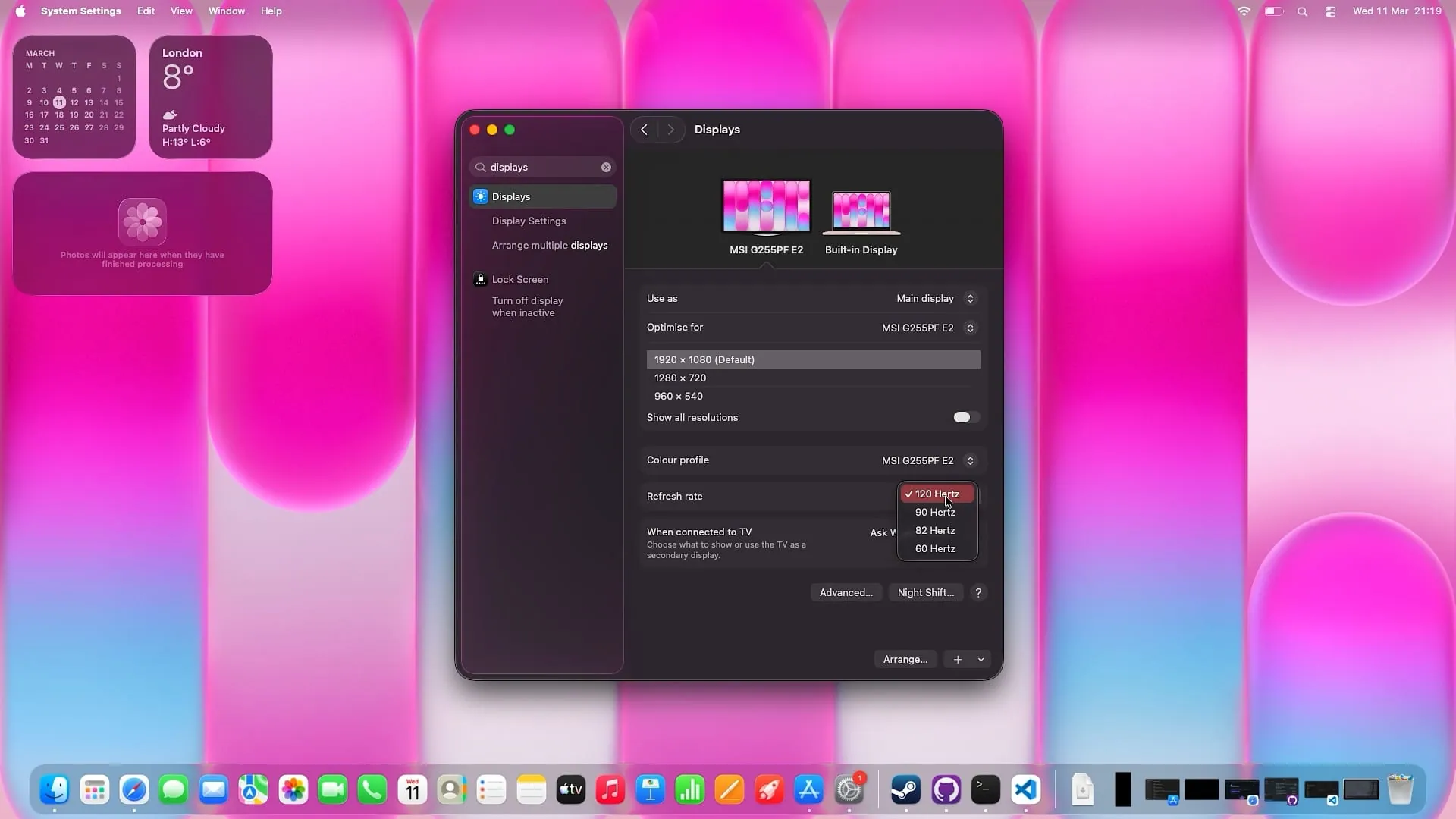
This makes sense: 1080p at 120Hz requires roughly the same bandwidth as 4K at 30Hz, well within the capabilities of the USB-C port. If you're planning to use the Neo with a 1080p or 1440p high-refresh monitor, you'll likely have a better experience than the 4K60 ceiling suggests.
Webcam
I am not a fan of being on camera, but for the sake of testing I recorded a brief clip on my balcony against the city lights at night. This is basically a worst-case scenario: low ambient light, lots of movement, and a noisy background.
There is clearly a lot of post-processing happening in low light, the image is soft and there is visible noise reduction. During daylight it is perfectly fine for video calls. I will leave detailed daytime webcam analysis to reviewers who actually enjoy being on camera.